

Table of Contents
- WordPress Headless CMS Benefits: The Foundation of Modern Web Performance
- The Core Architecture and Performance Gains of Headless WordPress
- Multi-Platform Publishing: Extending Your Content Reach with Headless WordPress
- Is Headless WordPress Right for Your Business? Traditional vs. Headless Considerations
- SEO Implications of Adopting a Headless WordPress CMS
- Long-Term Maintenance, Migration Paths, and Cost Planning for Headless WordPress
- Taking the Next Step with Headless WordPress and CloudnBugs
WordPress Headless CMS Benefits: The Foundation of Modern Web Performance
The WordPress headless CMS benefits center on decoupled architecture that separates content management from frontend presentation, delivering faster load times and greater flexibility. Unlike traditional WordPress, where the backend and frontend are tightly integrated, a headless setup uses the WordPress admin to manage content and APIs to distribute it to any frontend framework or platform, such as React, Vue, or a static site generator. This approach improves performance by reducing server-side processing, enhances security by isolating the public-facing layer, and gives developers the freedom to build with JavaScript tools. Businesses looking to publish content across websites, mobile apps, and IoT devices find headless WordPress valuable because it allows a single content repository to feed multiple channels without duplication. These advantages have made headless WordPress a compelling choice for businesses seeking high-performance, scalable digital experiences. Understanding how these benefits are achieved starts with examining the core architecture and performance fundamentals of a headless WordPress setup.
Key Takeaways
- WordPress sites traditionally make use of the monolith approach where all PHP scripts build up the full HTML response for each request sent from client side.
- It’s important to realize that decoupling your backend doesn’t just make things perform better; it enables you to deliver different types of content on various platforms all at once.
- Decoupling WordPress front-end presentation layers can speed up sites significantly, and that performance improvement can directly affect ranking factors and Core Web Vitals such as server response time.
- When implementing a headless architecture, there will be some measurable wins when it comes to SEO.
- After planning long-term maintenance, the logical next move is partnering with a team that can turn those plans into a stable, high-performing website.
The Core Architecture and Performance Gains of Headless WordPress
WordPress sites traditionally make use of the monolith approach where all PHP scripts build up the full HTML response for each request sent from client side. The data is mixed together with the layout. A Headless WordPress site would separate these two concerns. As before, WordPress would be used to manage our content. But rather than building out a complete web page, this instance of WordPress simply makes available its content via the REST API or Graphql. On the client side, a modern framework such as React, Vue, or Next.js consumes the data exposed by the API to produce the final interface, either as prebuilt HTML files or dynamically at run time in the user’s web browser.
This decoupled architecture would work kind of like a restaurant separating their kitchen from the dining area. While the kitchen (which in this case is the WordPress backend) prepares all the meals (all content), the dining room (which is the frontend) could be rearranged and duplicated as many times as needed without any changes inside the kitchen.
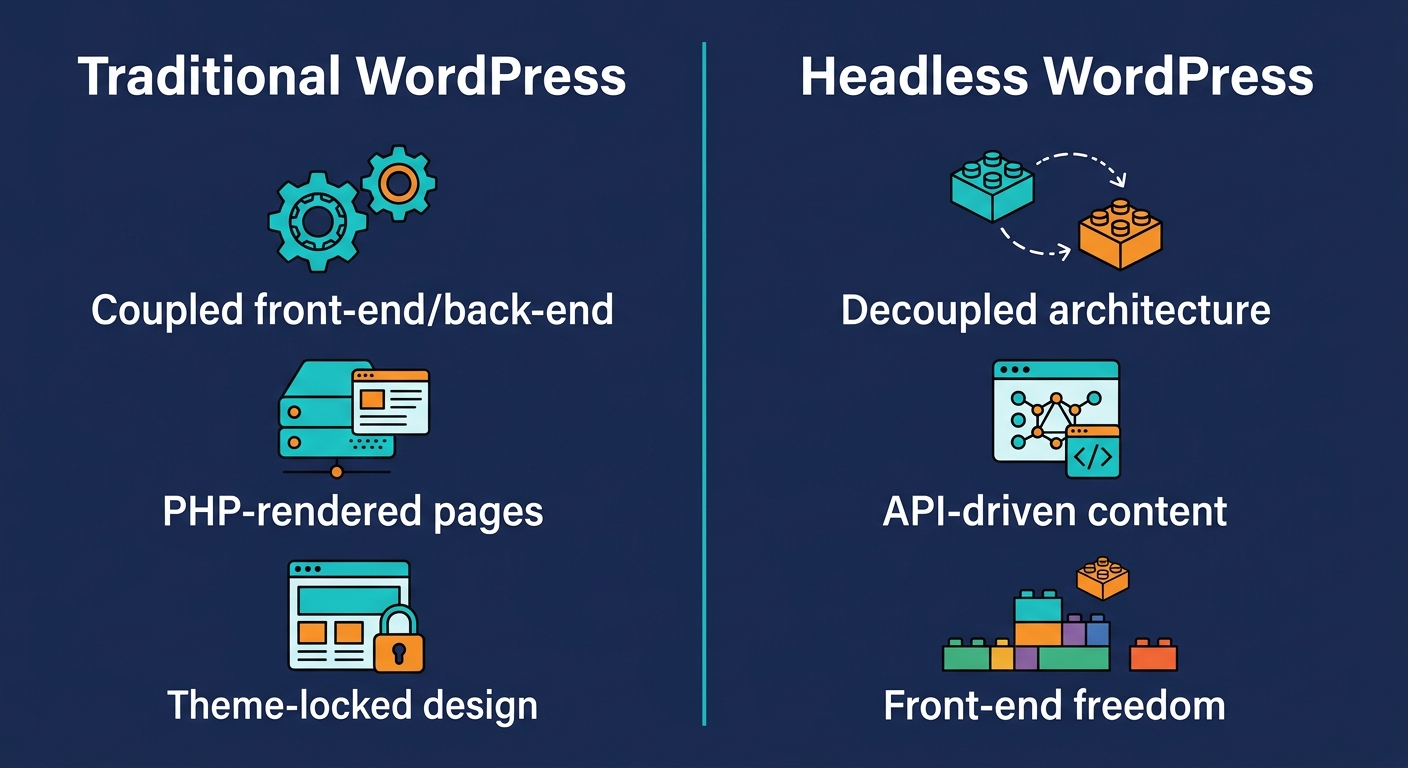
Decoupling brings concrete performance gains. The WordPress server, now delivering lightweight JSON responses instead of full page HTML, operates under less strain, freeing resources for content editing. The frontend, served as optimized static files or via client-side rendering, loads faster and navigates more smoothly. These gains directly improve Core Web Vitals metrics like Largest Contentful Paint and Cumulative Layout Shift, often contributing to better search rankings.
Another benefit of independent scaling: The API layer can be cached and served through a CDN without requiring the WordPress admin to be overloaded, which means the frontend could be load balanced across many instances to handle traffic surges. Because there’s no coupling between the front end and back end, a spike in front-end requests doesn’t slow down the authoring process at all. It also makes things easier when it’s time to update either the back end or the front end. For example, developers can rebuild the front end without changing anything on the content store and the two aren’t coupled to each other. In addition, the public-facing app remains separate from the CMS, so there are fewer points where breaches may occur. Because everything flows through an API, companies can use the same content to populate different applications like web sites, native mobile apps or even digital signs. That ability to publish across channels flows naturally from a decoupled architecture and sets the stage for a truly omnichannel presence.
Multi-Platform Publishing: Extending Your Content Reach with Headless WordPress
It’s important to realize that decoupling your backend doesn’t just make things perform better; it enables you to deliver different types of content on various platforms all at once. Using headless WordPress as an example, data and other content are still stored and managed through the usual WordPress interface, but instead of pushing everything into a single template for the front-end site, those items now come out through a REST API or a GraphQl endpoint. That way, developers can send the exact same article or product listing to a web page, an app, a kiosk screen, a voice assistant…all without having to duplicate the actual content itself.
Writers and editors post information only once, then the API makes that content available across all connected channels instantly, eliminating manual duplication and reducing maintenance overhead. In addition, the same content is reused in each channel, saving the publisher from having to maintain multiple versions. That’s why it helps brands present consistent messages anywhere users interact with them, whether reading newsletters on a web browser or tapping through a native mobile app. For businesses expanding into new channels, headless WordPress dramatically shortens time-to-market because frontend teams can build lightweight, channel-specific interfaces without reinventing the content management layer. One huge benefit of using headless WordPress as a CMS is the ability to push content to different platforms effortlessly and support multichannel strategies that deliver personalization when and where consumers need it.
For example, consider a regional service provider that hosts both its company website as well as a customer-facing app. Under a traditional approach, any time someone makes changes to a service description he or she has to edit it twice. In a headless setup, the CMS acts as the sole source of truth: When a marketing specialist updates a page via their WordPress instance, the new information will automatically be reflected across both the website and app through the API. That way, all touch points are kept up-to-date and the marketing team can concentrate solely on providing high-quality copy.
For businesses weighing whether a headless architecture aligns with their long-term strategy, the ability to extend content reach across any platform is a critical differentiator. This allows companies to take advantage of all the benefits of using WordPress without being limited to just a single site, making it possible to turn a traditional WordPress implementation into a content hub that can power other aspects of your digital infrastructure. As we look at how a conventional WordPress site works versus what happens in a headless environment, this distinction becomes more apparent.
While a decoupled WordPress architecture can extend your content across websites, apps, and IoT devices, it also introduces decisions that affect your team, budget, and long-term flexibility. Traditional WordPress couples the front-end theme layer tightly with the backend. Headless WordPress, by contrast, uses the CMS as a content repository, delivering data via REST or GraphQL API to a separate front-end built with modern frameworks.
What a decoupled architecture brings
- Front-end freedom – You’re not limited to PHP templates; build with React, Vue, or static site generators.
- Performance – Optimized static or server-rendered front-ends often deliver faster load times and better Core Web Vitals.
- Omnichannel content – The same content can be reused across multiple platforms and devices.
- Developer experience – Modern tooling, version control, and CI/CD pipelines appeal to engineering teams.
Trade-offs to weigh
- Higher cost and complexity – Managing two environments increases initial development effort.
- Separate hosting – The front-end needs its own infrastructure (Netlify, Vercel, etc.), which adds ongoing cost.
- Developer dependency – Presentation changes often require code updates, reducing marketing agility.
- Editor experience – Non-technical users accustomed to the block editor may find headless interfaces less intuitive.
When customers come to us asking about whether they should go headless or not, we look at their teams’ strengths and their long-term goals. Organizations that have a strong front-end development capability and want to deliver content in multiple channels could make a great candidate for going headless. Teams who don’t know how to code or who only know drag-and-drop editing would find it easier to stick with regular WordPress. If you’re looking into whether the extra cost and effort are worth the potential benefits, take into account your scalability needs. You could start off going headless where needed (like the high traffic or mobile section) but keep regular themes elsewhere. This works as sort of a middle step.
This decision affects both search engine crawls and ranking of web pages. Therefore, understanding those SEO implications is essential to protecting your organic visibility as you adopt modern delivery methods. If we look at these changes from the perspective of modern methods, it becomes evident that some choices may affect your visibility in search results.
SEO Implications of Adopting a Headless WordPress CMS
Decoupling WordPress front-end presentation layers can speed up sites significantly, and that performance improvement can directly affect ranking factors and Core Web Vitals such as server response time. Faster initial server response times and the ability to deliver content through a global CDN can lower bounce rates and increase crawl efficiency, both of which contribute to stronger organic visibility.
Unfortunately, these performance improvements rely on being configured correctly. If your application doesn’t perform either server-side rendering or static-site generation, a JavaScript-rendered page might be slow on its first load, or even fail to serve up indexable content to a search engine crawler. In order to make sure that every page is available for crawlers to see and follow, you’ll need some form of rendering in place – whether that means server-side rendering, static site generation, or dynamic pre-rendering.
With the traditional WordPress admin layer removed, SEO-critical elements like meta titles, descriptions, and structured data must be managed through the front-end framework — typically via API-driven fields or headless CMS plugins — rather than using familiar tools like Yoast SEO. This shift requires upfront planning to generate accurate canonical URLs and consistent metadata across all content types.
If your site has too much JavaScript, crawlers could miss important pieces of data if it’s not properly rendered. We recommend mitigation techniques including dynamic rendering, hybrid SSG, and regular tests using Google’s URL Inspection and Rendering tools to ensure all pages are fully crawlable and indexable.
A headless version of your site can simplify adopting AMP or PWAs; however, this isn’t necessarily the case. If the development team hasn’t paid attention to the headless configuration then the resulting AMP pages could result in duplicated content whereas a PWA might not provide all the necessary structured data needed for better SEO performance.
CloudnBugs can provide performance audits, Core Web Vitals optimization, and strategic guidance to help businesses realize the SEO advantages of headless infrastructure while avoiding common crawlability problems, and partnering with a development and SEO team that understands both the technical implications and practical implementation constraints can reduce risk.
This is especially useful when you think about what might be done down the road for upkeep, moving over web site copies, and how much this could all end up costing.
Long-Term Maintenance, Migration Paths, and Cost Planning for Headless WordPress
When implementing a headless architecture, there will be some measurable wins when it comes to SEO. But as is true in most things, this is a day-to-day battle. Budget accordingly. Plan for pro-active maintenance. And have well-defined migration paths that allow your website to grow and change with its business needs over time.
Headless WordPress Maintenance: The upkeep of a headless WordPress setup involves regular security patches applied to the WordPress backend, ongoing updates to the selected front-end framework, and constant monitoring of the APIs that connect content to presentation. Plugin compatibility checks remain essential, because the WordPress admin continues to power content creation even after the public-facing site moves to a decoupled front end.
Moving From Traditional To Headless: Most commonly, people migrate their own WordPress sites to a decoupled model by exporting content and media files, then rebuilding a fresh front-end experience with some new tooling. Their WordPress install ends up acting purely as a content source that’s served over REST or WPGraphQL, while either being used with static pages, server rendering, or anything else. Migration from traditional to headless:
Cost planning: One-time development costs encompass architecting and designing the site, custom themes, as well as the front-end build process. Recurring operation costs relate more specifically to front-end web hosting, which is typically billed monthly, and the WordPress back end, which requires its own secure hosting environment. Additional recurring costs include API consumption, CDN bandwidth, and a developer retainer to handle framework upgrades and bug fixes.
We have several options for maintenance including Basic, Standard and Premium, which offer clear scope for work and provide priority support that can be applied to headless setups. They include security monitoring, plugin/framework updates, and performance testing.
Future migration paths: A headless architecture should be flexible enough to accommodate future shifts – whether that means switching from Gatsby to another static website generator or moving to a different hosting provider. While the content repository remains the same (WordPress), its decoupled nature will make these moves much easier. Thinking ahead and planning this saves us having to take on more technical debts and makes our company as agile as possible.
When you understand your long-term needs and cost drivers, you can evaluate how a partner like CloudnBugs can execute the migration and provide ongoing support. From decoupling to maintenance, our staff provides guidance through every stage, helping you focus on growth rather than technical overhead.
Frequently Asked Questions
Is a headless WordPress approach right for my specific business needs or is traditional WordPress sufficient?
A headless WordPress approach suits high-growth companies, media platforms, and enterprise sites needing multi-channel publishing. Traditional WordPress remains sufficient for teams without advanced front-end skills or heavy omnichannel demands. CloudnBugs provides platform selection consultation to determine which architecture fits your business goals.
What are the main performance and flexibility benefits of a headless WordPress architecture?
Faster load times through lightweight API responses and static file serving improve Core Web Vitals such as Largest Contentful Paint. Front-end freedom allows building with modern JavaScript frameworks like React or Vue, free of PHP template constraints. Independent scaling of the frontend and backend handles traffic surges smoothly.
Can a headless WordPress setup help my business publish content across multiple platforms simultaneously?
Yes, a headless WordPress setup publishes content simultaneously across multiple platforms by delivering it through the REST API or GraphQL to websites, apps, and other devices. Editors update content once in the WordPress dashboard, and it populates all channels automatically. CloudnBugs can integrate such omnichannel delivery into custom builds.
How does moving to a headless WordPress CMS impact my website’s SEO and search engine visibility?
Moving to headless can boost search visibility through faster load times and stronger Core Web Vitals, but requires server-side rendering or static generation to ensure crawlability. SEO elements like meta tags must be managed via the front-end framework. CloudnBugs provides Core Web Vitals optimization and strategic guidance to protect organic rankings.
What are the long-term maintenance and cost considerations when switching to a headless WordPress build?
Long-term maintenance includes regular WordPress security patches, front-end framework updates, and API monitoring. Costs rise due to separate hosting and greater developer dependency for presentation changes. CloudnBugs offers transparent maintenance plans with defined scopes, priority support, security monitoring, and performance checks.
Taking the Next Step with Headless WordPress and CloudnBugs
After planning long-term maintenance, the logical next move is partnering with a team that can turn those plans into a stable, high-performing website. The benefits of a headless WordPress CMS—dramatically faster page loads through decoupled architecture, the flexibility to deliver content across web, mobile, and IoT channels, and a reduced attack surface that strengthens security—are compelling.
We offer a simple, transparent three-tier maintenance plan: Basic, Standard and Premium. Your scope, priority support, emergency hack fix, security monitoring, backup and performance check is included here. We will be able to help you whether your tech stack sits on WordPress, Shopify, Wix and WooCommerce. If you live in North Carolina, let’s get in touch.
This content is only meant for informative & services-related purposes and isn’t intended as legal or financial advice. Our privacy policy explains data collection, use, and retention. Results will differ based on individual circumstances and prior success doesn’t guarantee outcomes in the future.
Get Expert Headless WordPress Help
You’ve now explored the significant WordPress headless CMS benefits, including performance, flexibility, and security. Transitioning to a decoupled architecture requires strategic planning and technical expertise. Our team helps businesses across North Carolina implement headless WordPress and maintain it for long-term success. Our transparent maintenance plans include defined scopes, priority support, and emergency hack-recovery to keep your site secure. With multi-platform expertise covering WordPress, Shopify, Wix, and WooCommerce, we can support your entire digital ecosystem. Reach out to our team for a consultation and move forward with confidence.
Get Expert Headless WordPress Help